
Viewing RNA-seq Data
Last updated on 2026-09-03 | Edit this page
Estimated time: 40 minutes
Overview
Questions
- How do I see which exons are spliced together in RNA-seq data?
- How do I compare splicing patterns between two samples or tissues?
- Why do RNA-seq reads look different from the DNA reads in the previous episode when aligned in IGV?
Objectives
- Enable the splice junction track for RNA-seq alignment data.
- Load RNA-seq data hosted on the IGV server for two tissues.
- Interpret coverage and splice junction tracks to identify alternative splicing.
- Generate and interpret a Sashimi plot.
Background: why RNA-seq alignments look “split”
RNA-seq sequences mature mRNA, not genomic DNA. By the time a gene’s pre-mRNA becomes mRNA, its introns have already been spliced out, so the short reads generated from it are sampled from a continuous stretch of joined-together exons, with no intron sequence in between.
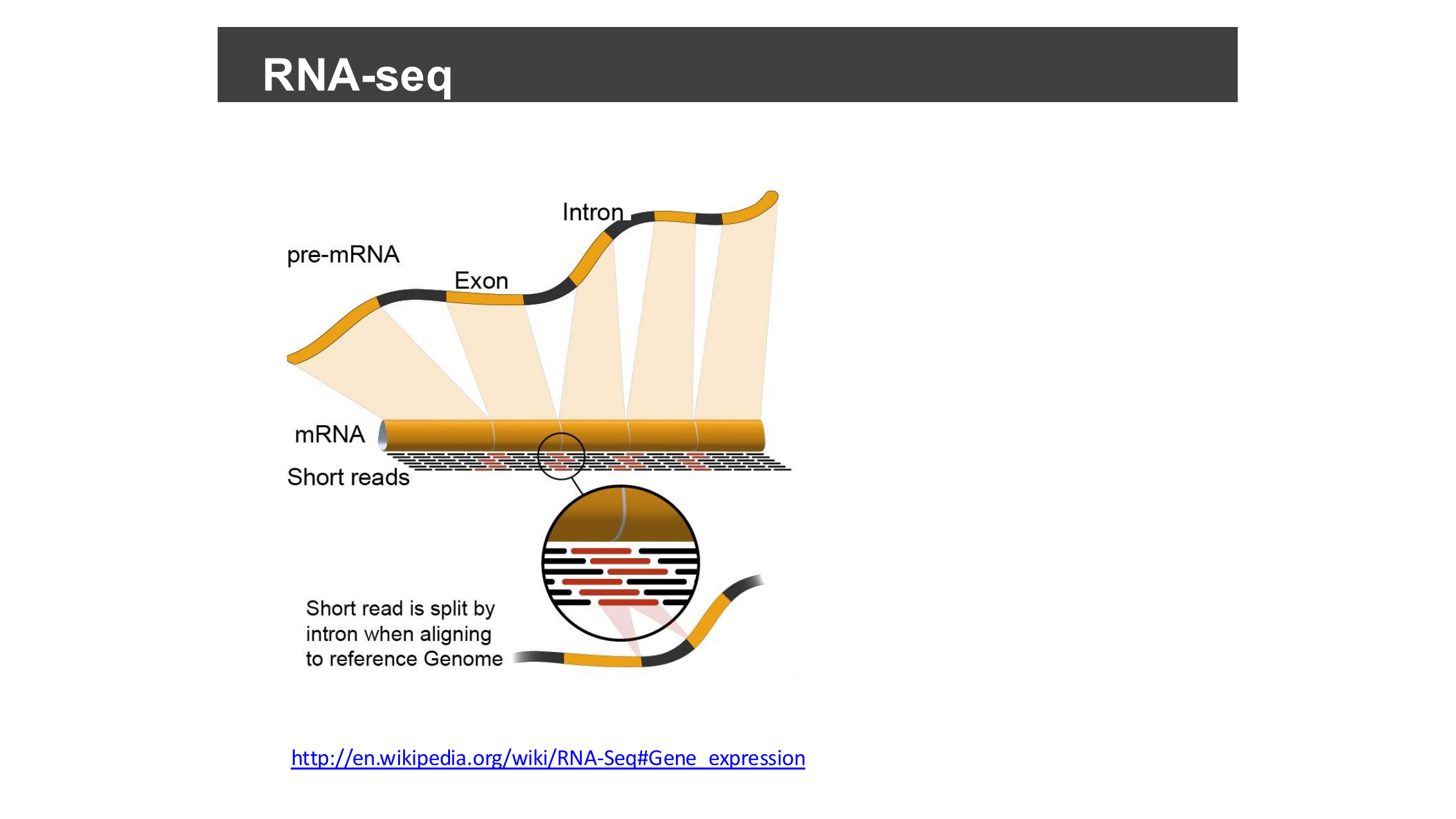
The reference genome, however, still contains the introns. So when an RNA-seq read happens to span two exons, aligning it back to the genome means the aligner has to split that one read into two pieces with a gap between them — the gap corresponds to the intron that was removed from the mRNA. This is exactly the “read spanning a splice junction” you will see represented as a gapped alignment, and later as an arc in the splice junction track.
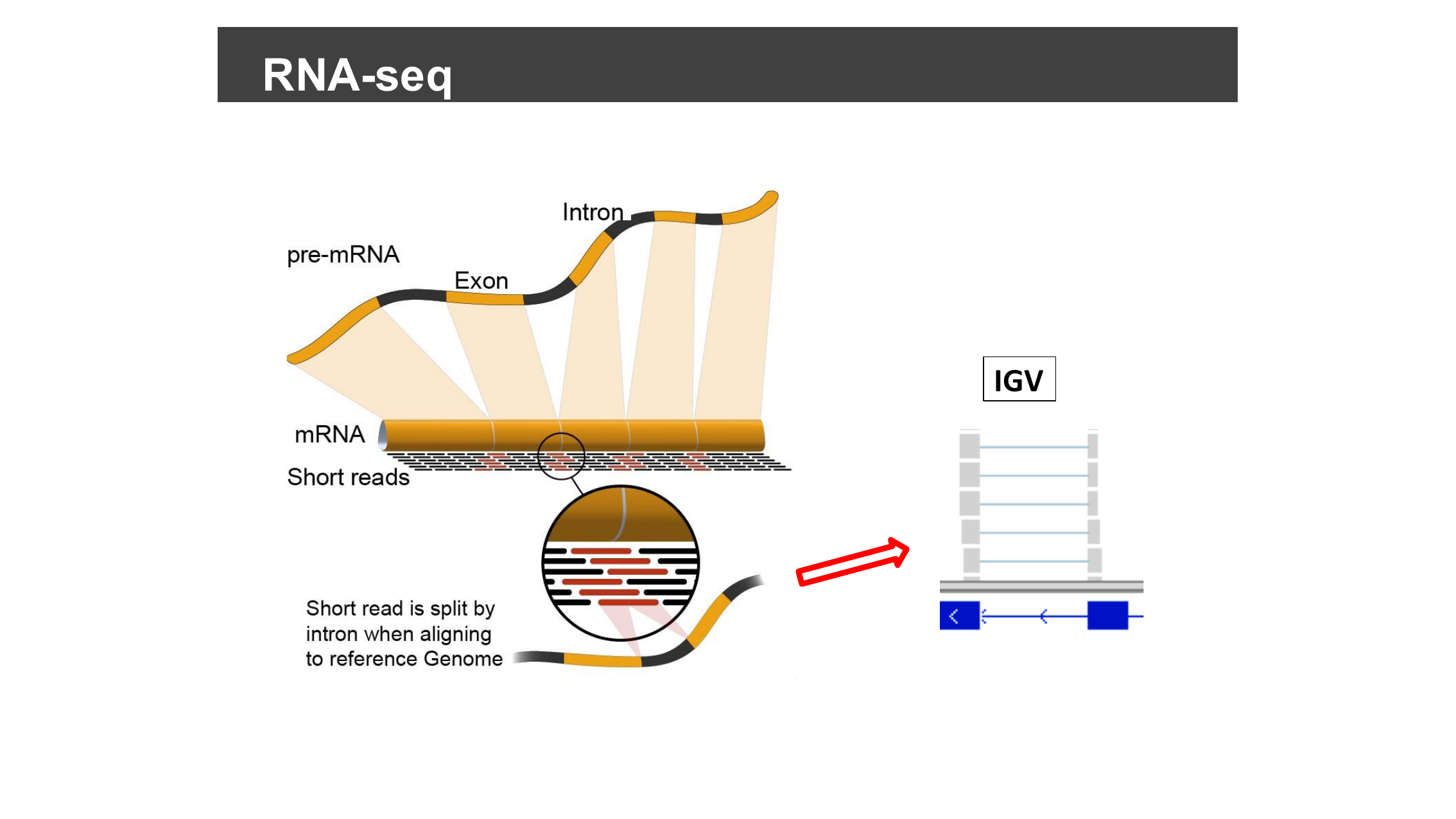
(Diagram source: Wikipedia, RNA-Seq § Gene expression.)
This episode uses example RNA-seq data hosted on the IGV server, so you will need an internet connection.
Set preferences to show splice junctions
Select View > Preferences…, then the Alignments tab, and check Splice Junction Track under “On initial load show”.
Load RNA-seq data
Select Human hg19 from the genome drop-down menu. Then select File > Load from Server…, open the Tutorials menu, check the box next to RNA-Seq (Body Map), and click OK.
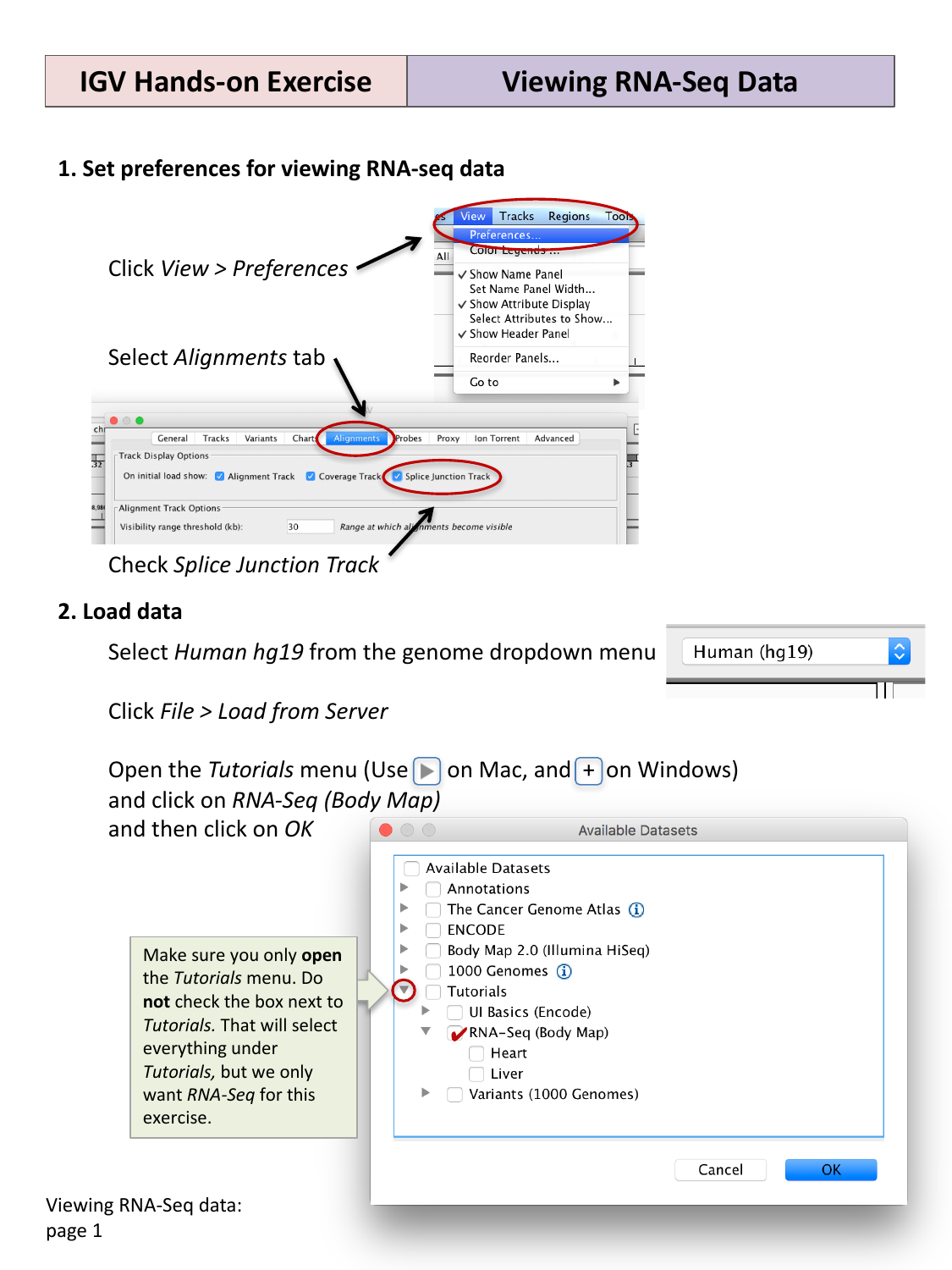
This loads coverage, alignment, and splice junction tracks for two tissues: heart and liver.
Jump to a gene and explore isoforms
Type SLC25A3 into the search box and click
Go.
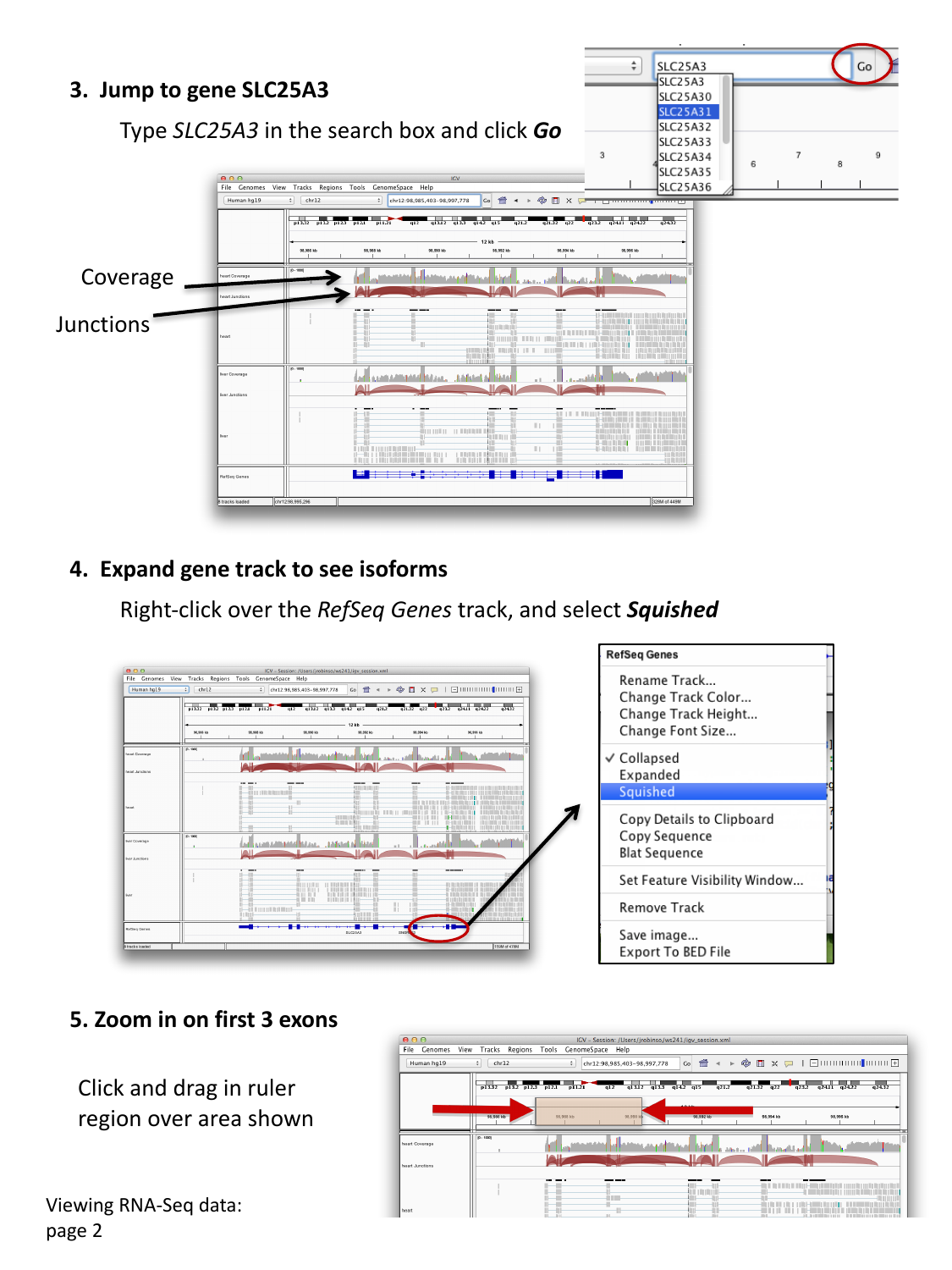
You should see, for each tissue:
- a coverage track (how many reads cover each position), and
- a junctions track (arcs connecting exons that were spliced together in at least one read).
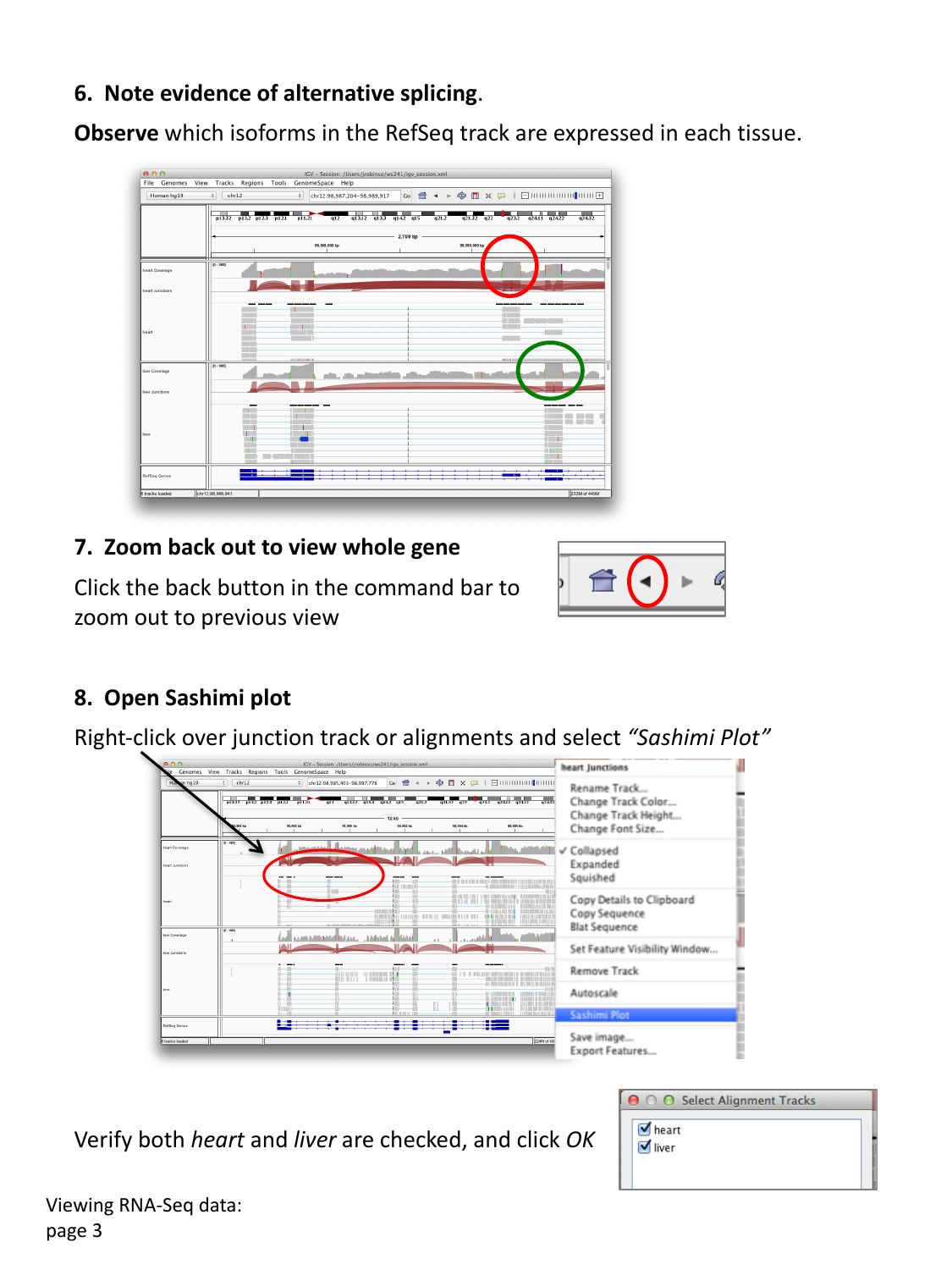
Right-click the RefSeq Genes track and select Squished to reveal multiple isoforms of the gene on separate, compact rows.
Look for evidence of alternative splicing
Zoom in on the first three exons by clicking and dragging in the ruler over that region. Compare which isoforms in the RefSeq track are consistent with the coverage and junction pattern seen in each tissue.
Spot the difference between tissues
Looking at the heart and liver coverage/junction tracks side by side around the first few exons, can you find a region where one tissue shows a peak of coverage (an exon being used) that the other tissue does not?
Around the first few exons of SLC25A3, one tissue shows
a small “bump” of coverage — indicating a short exon or extra exonic
sequence — that is absent, or much lower, in the other tissue. This is a
sign of a tissue-specific alternatively spliced exon: the same gene
locus produces different transcript isoforms depending on which tissue
the RNA was sequenced from.
Zoom back out to view the whole gene again using the back button in the command bar.
Sashimi plots
A Sashimi plot is a specialized view for RNA-seq splicing that combines coverage and junction arcs into a single, cleaner visualization. Right-click over a junction track (or the alignments) and select Sashimi Plot. If prompted to select alignment tracks, verify that both heart and liver are checked, and click OK.
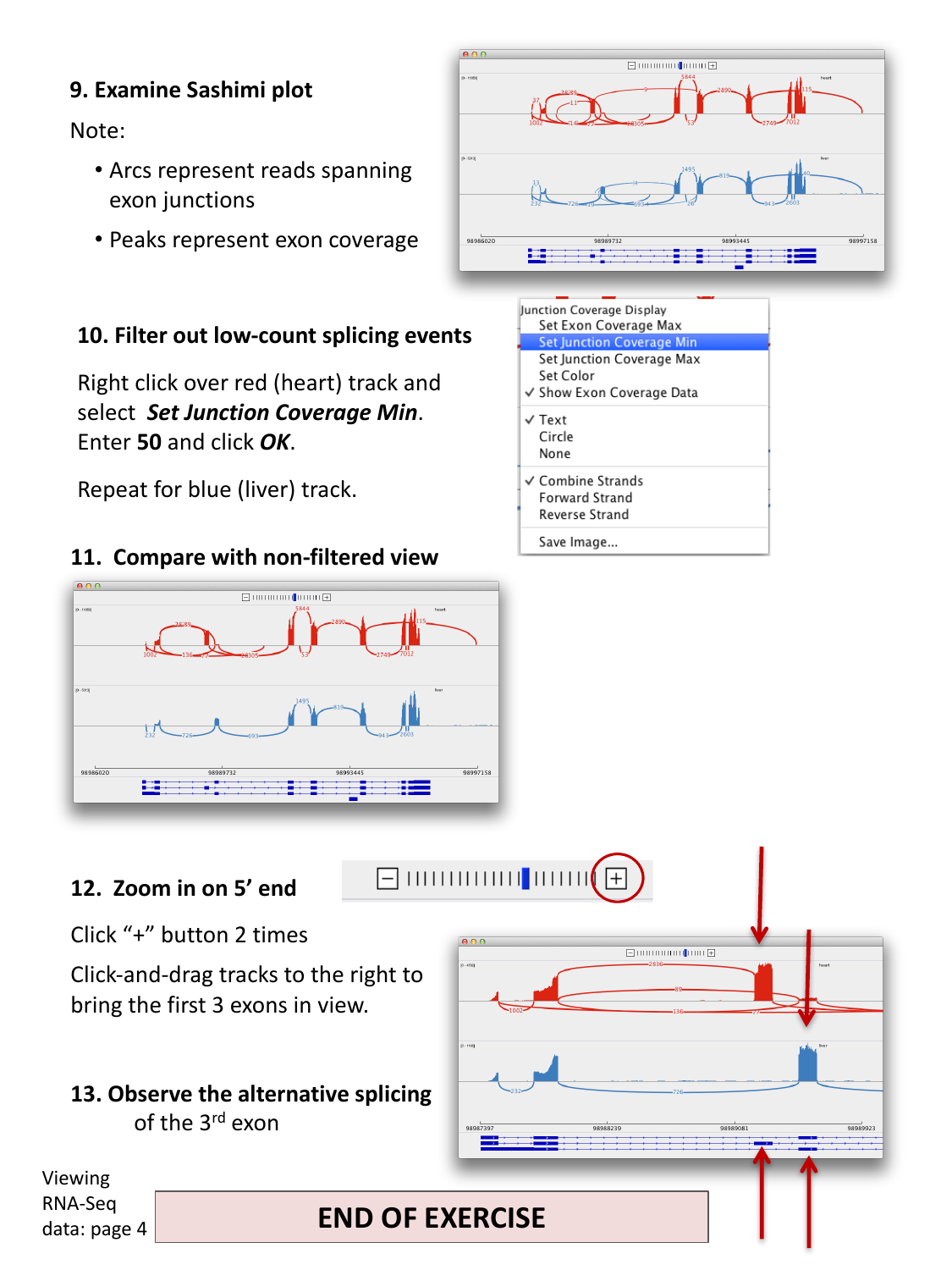
In a Sashimi plot:
- Arcs represent reads spanning an exon-exon junction; the number on the arc is the number of supporting reads.
- Peaks represent per-base exon coverage.
Filter out low-count splicing events
Real datasets often contain many low-count, spurious-looking
junctions. Right-click over one track (e.g. the red/heart track) and
select Set Junction Coverage Min. Enter 50
and click OK. Repeat for the other track
(e.g. blue/liver).
Compare this filtered view to the original, unfiltered one — filtering makes it much easier to see the dominant, well-supported splicing pattern in each tissue, without being distracted by rare junctions.
Confirm alternative splicing of the third exon
Zoom in on the 5’ end of the gene (click “+” on the zoom widget a couple of times, then click-and-drag the tracks to bring the first three exons into view). Compare the junction arcs for heart and liver around the third exon.
One tissue’s junction arcs skip over the third exon entirely (an arc jumps directly from exon 2 to exon 4), while the other tissue’s arcs include a junction into and out of exon 3. This is direct evidence, at the level of individual spliced reads, that exon 3 is alternatively spliced (included in one tissue’s dominant transcript, but skipped in the other’s).
Watch: IGV RNA-seq Data Basics and Advanced
- RNA-seq reads come from spliced mRNA (introns already removed), so a read spanning two exons aligns back to the intron-containing genome as a gapped, “split” alignment.
- Enable the splice junction track (via View > Preferences > Alignments) to see, as arcs, which exons are spliced together in RNA-seq data.
- Compare coverage and junction tracks across samples or tissues to spot alternative splicing.
- A Sashimi plot combines exon coverage (peaks) and junction reads (arcs) in one view, and read-count filtering helps focus on well-supported junctions.