
Viewing Long-Read Sequencing Data
Last updated on 2026-09-04 | Edit this page
Estimated time: 30 minutes
Overview
Questions
- How does IGV handle long reads differently from short Illumina reads?
- How do I tell real signal from raw sequencing error in noisy long reads?
- How can long reads and read phasing help interpret structural variants and repeat expansions?
- Can IGV view a file that lives on a remote server, without downloading it first?
Objectives
- Explain how long-read sequencing (PacBio, Oxford Nanopore) differs from short-read sequencing in IGV.
- Use IGV’s alignment preferences to filter raw long-read errors and reveal consensus signal.
- Interpret mapping quality (MAPQ) when assessing a long-read alignment.
- Recognize split reads as evidence for structural variants in long-read data.
- Load remote BAM/CRAM files directly from a public archive and use linked supplementary alignments and strand coloring to confirm an inversion.
- Use haplotype-tag coloring to visualize phased variants, including assessing whether a structural variant is heterozygous or homozygous.
This episode is optional
This is a supplementary episode — cover it only if time allows. It
does not use the workshop’s igvData files; instead it walks
through published examples and one live hands-on exercise using public
data streamed directly from a remote server (which needs an internet
connection).
Background: what makes long reads different
Illumina (“short-read”) sequencing produces reads a few hundred base pairs long with a very low per-base error rate. Third-generation platforms — PacBio and Oxford Nanopore — instead produce long reads, roughly 10,000 to 100,000 base pairs, at the cost of a much higher raw error rate in each individual read. With enough coverage, those per-read errors average out into a highly accurate consensus, but any single long read, viewed on its own in IGV, looks considerably noisier than a short Illumina read.
Filtering raw errors to see the consensus signal
Because of this, IGV includes alignment display options specifically
aimed at long reads: filtering out raw single-read errors so the
underlying consensus signal is easier to see, and extended support for
split alignments (linking a read’s split parts together, using the
SA BAM tag).
Compare the same 10 kb region of chromosome 10, sequenced with both PacBio and Illumina:
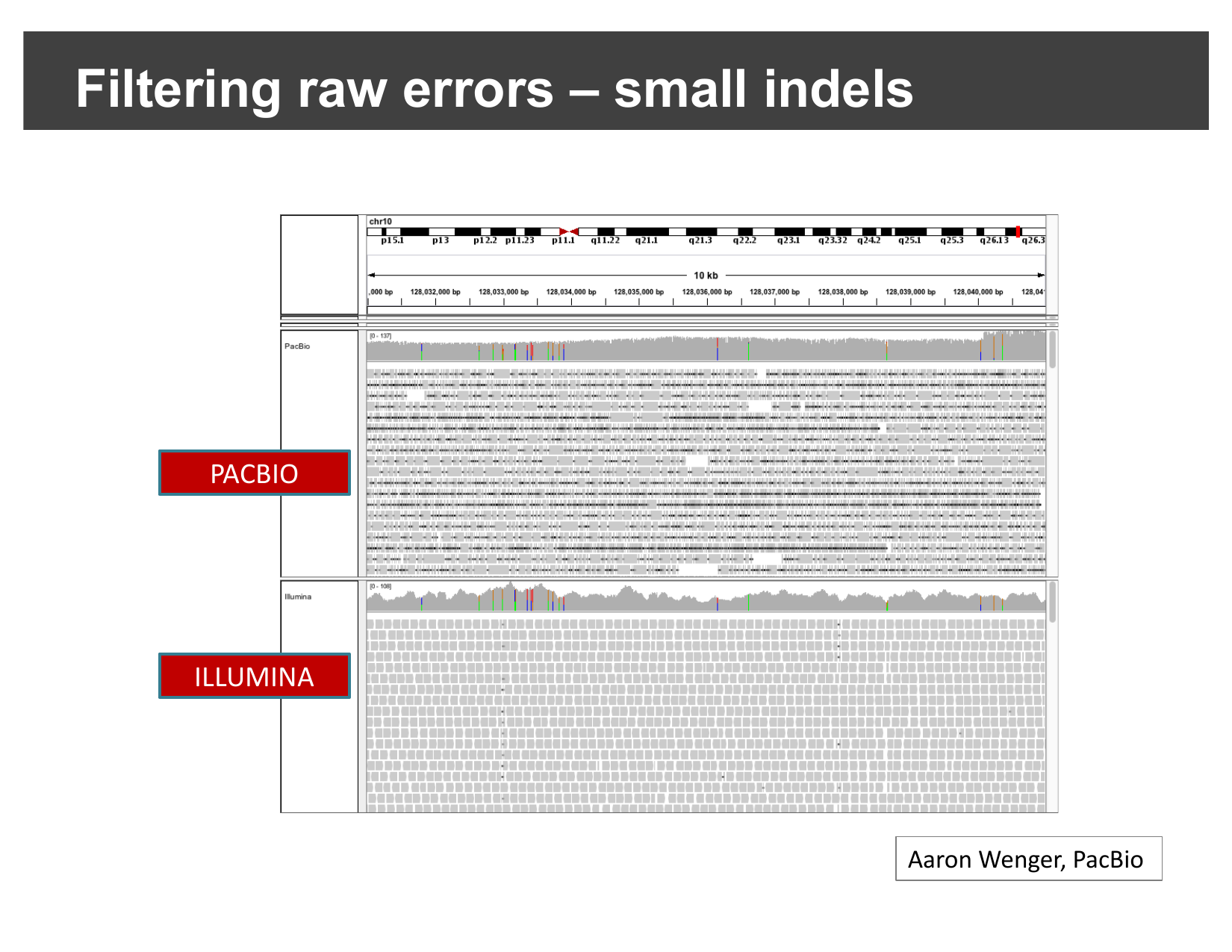
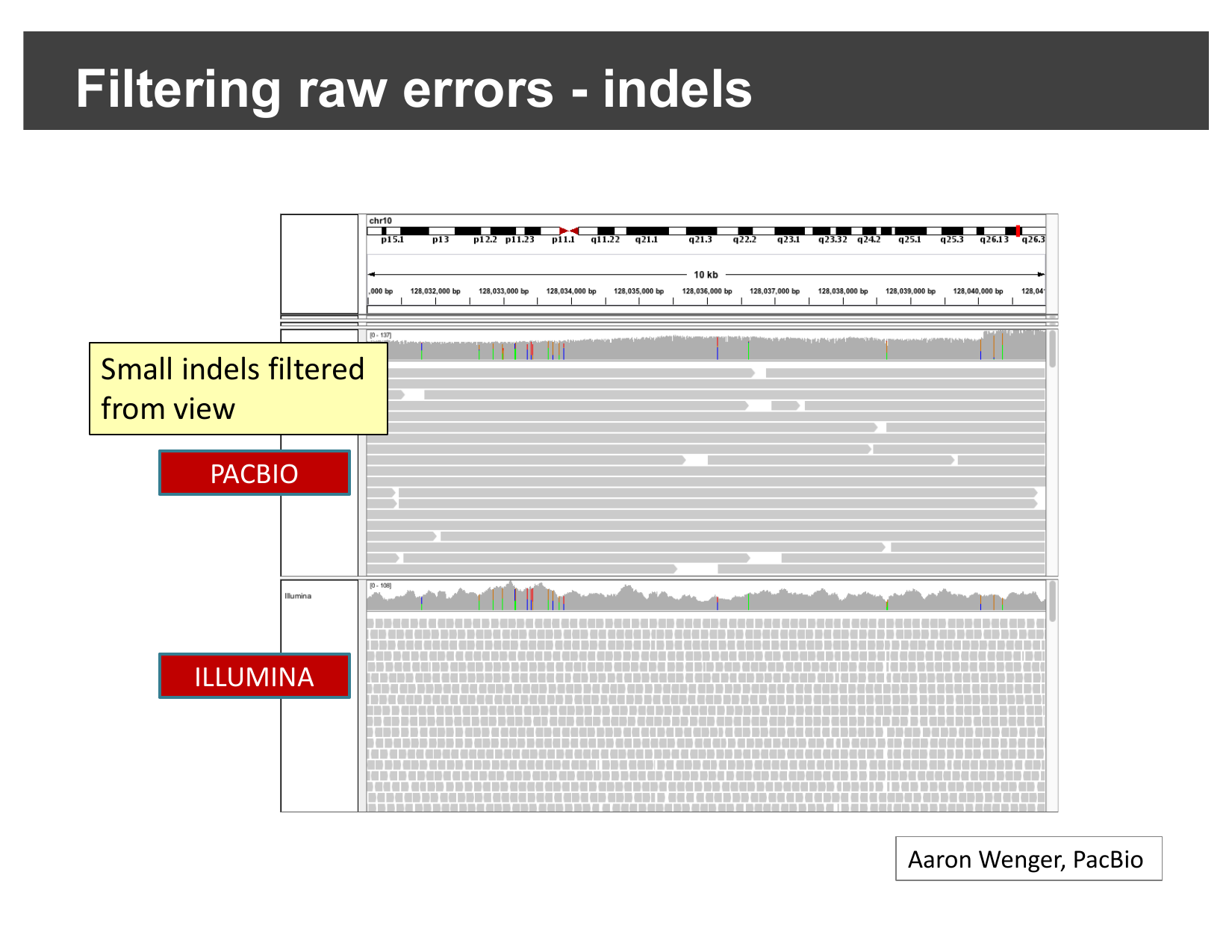
Most of that PacBio noise is small indels — a single insertion or deletion of a few bases in an individual read, not a real biological difference from the reference. Hiding indels below a chosen size (and enabling quick consensus mode, which suppresses a mismatch unless it is shared by enough reads to look real) filters this out:
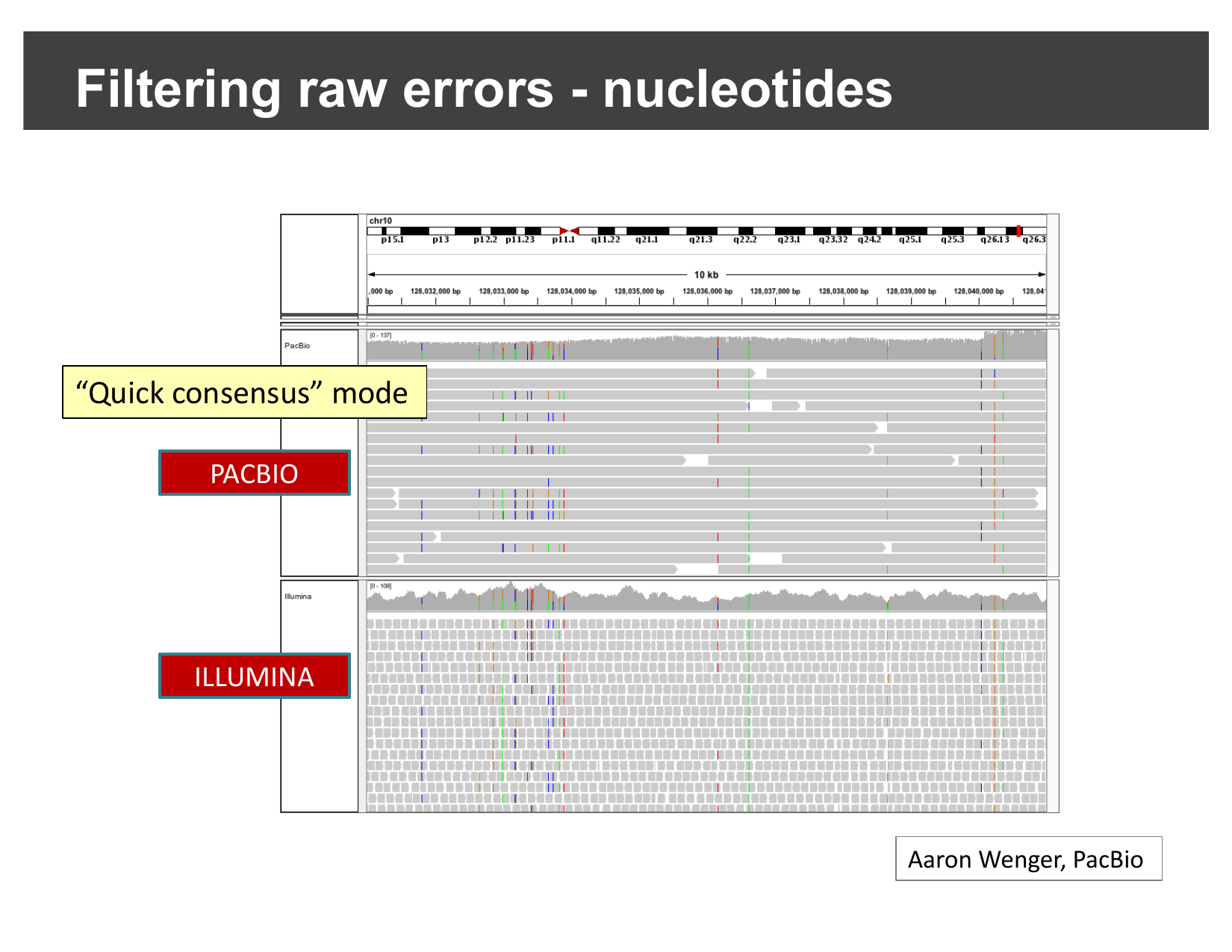
The same idea applies to single-base mismatches. With quick consensus mode enabled, only mismatches that recur consistently across reads (a real variant) are still shown; one-off raw sequencing errors are suppressed:
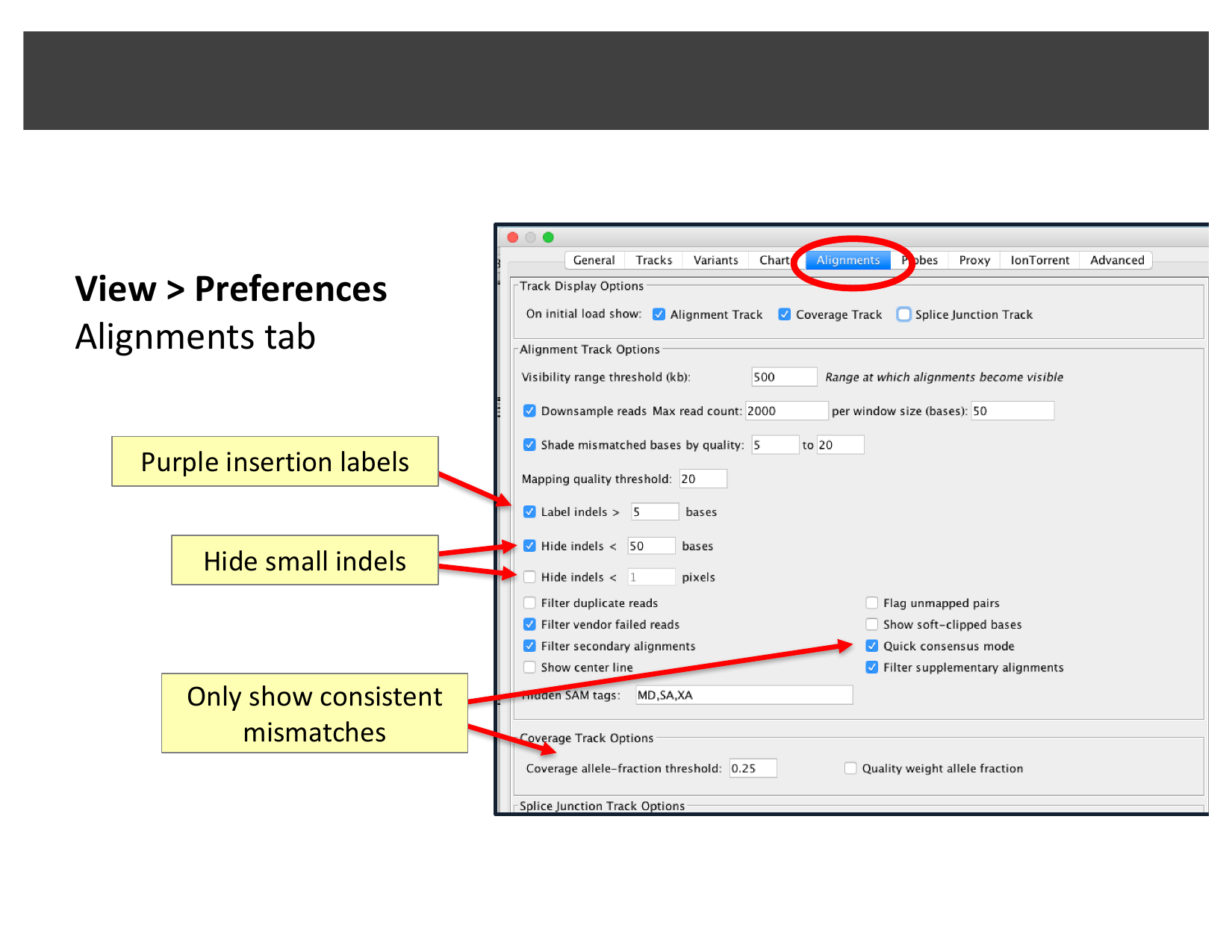
These options live under View > Preferences… > Alignments:
Why filter at all?
If quick consensus mode and indel-hiding can suppress real, rare variants along with sequencing noise, why would you ever want to turn them on?
They trade a small risk of hiding a genuine low-frequency variant for a much larger gain in readability: without filtering, a long-read track can be so dense with single-read noise that a real, well-supported signal is hard to distinguish by eye. Filtering is a first-pass visual aid — for any locus you are seriously evaluating, you would still want to check the unfiltered view and the read-level evidence before ruling a variant real or an artifact.
Real examples: reviewing nanopore BAM files
The examples below are adapted from Oxford Nanopore’s EPI2ME team’s guide, “A guide to reviewing BAM files” — reproduced here with attribution; the screenshots in this section remain © Oxford Nanopore Technologies and are not covered by this lesson’s CC-BY license.
Before loading any BAM file, two things matter regardless of sequencing platform: it must be aligned against the same reference genome you have selected in IGV (mismatched coordinates can misdisplay data or crash IGV), and it should be sorted and indexed first.
Mapping quality (MAPQ)
Every aligned read carries a MAPQ score (0–255) reflecting how confident the aligner is that the read belongs at that exact genomic location — higher is more confident. Clicking a read in IGV shows its MAPQ directly:
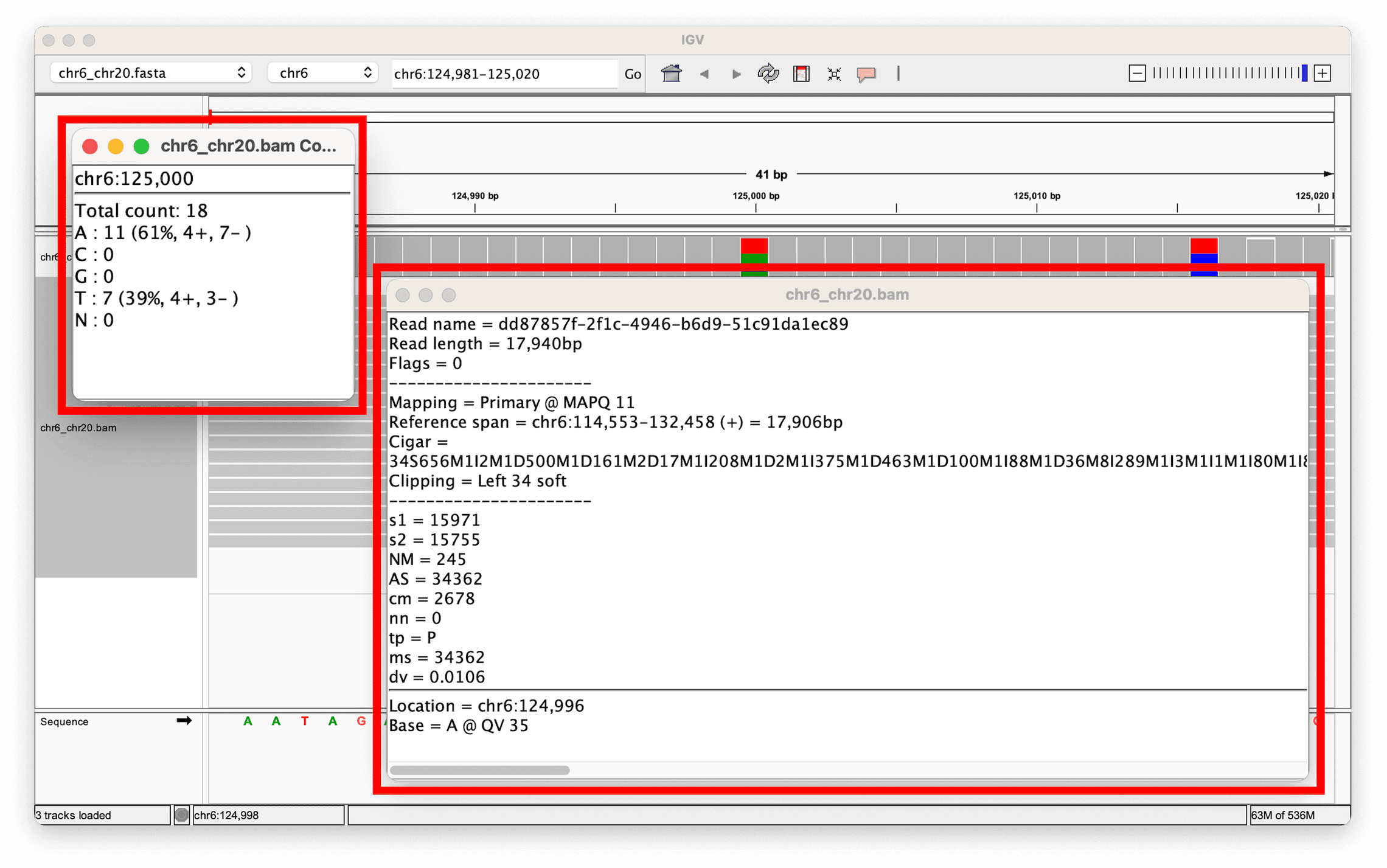
Clicking the coverage track instead shows the allele counts at that position — here, a heterozygous site with 11 reads (61%) supporting the reference base and 7 reads (39%) supporting an alternate base:
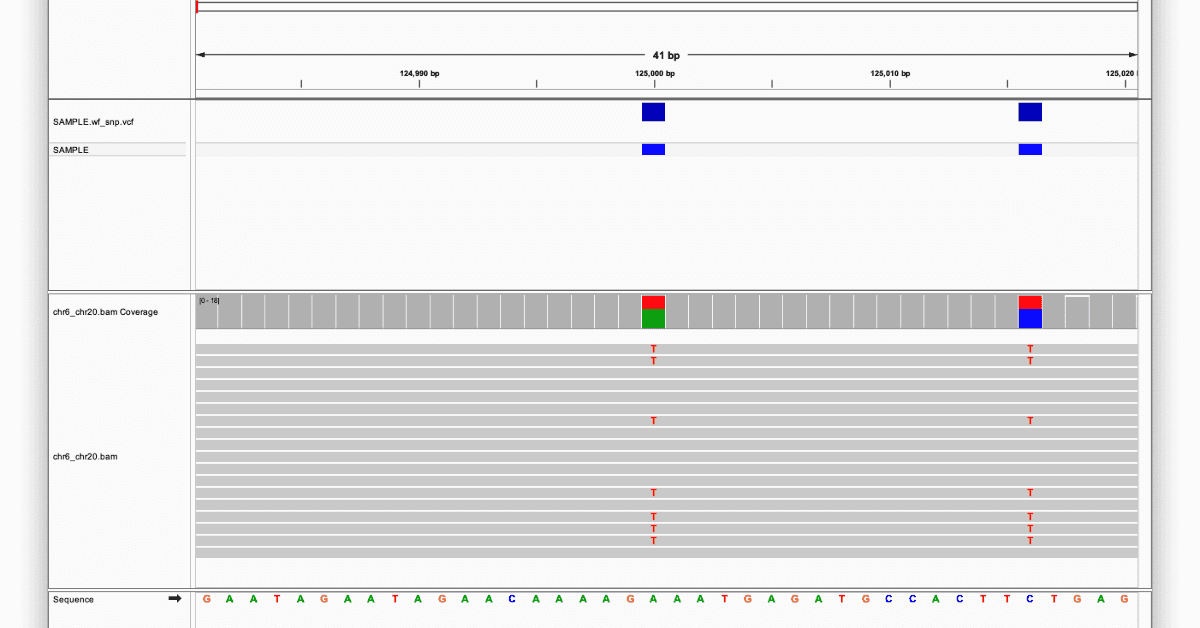
A MAPQ in the low single digits (as opposed to 60, a common “fully confident” ceiling) is a warning sign: reads that cannot be confidently placed at a unique location make any variant called from them less trustworthy — the same caution you applied to BLAT results in Viewing Alignments and SNPs.
Split reads as evidence for structural variants
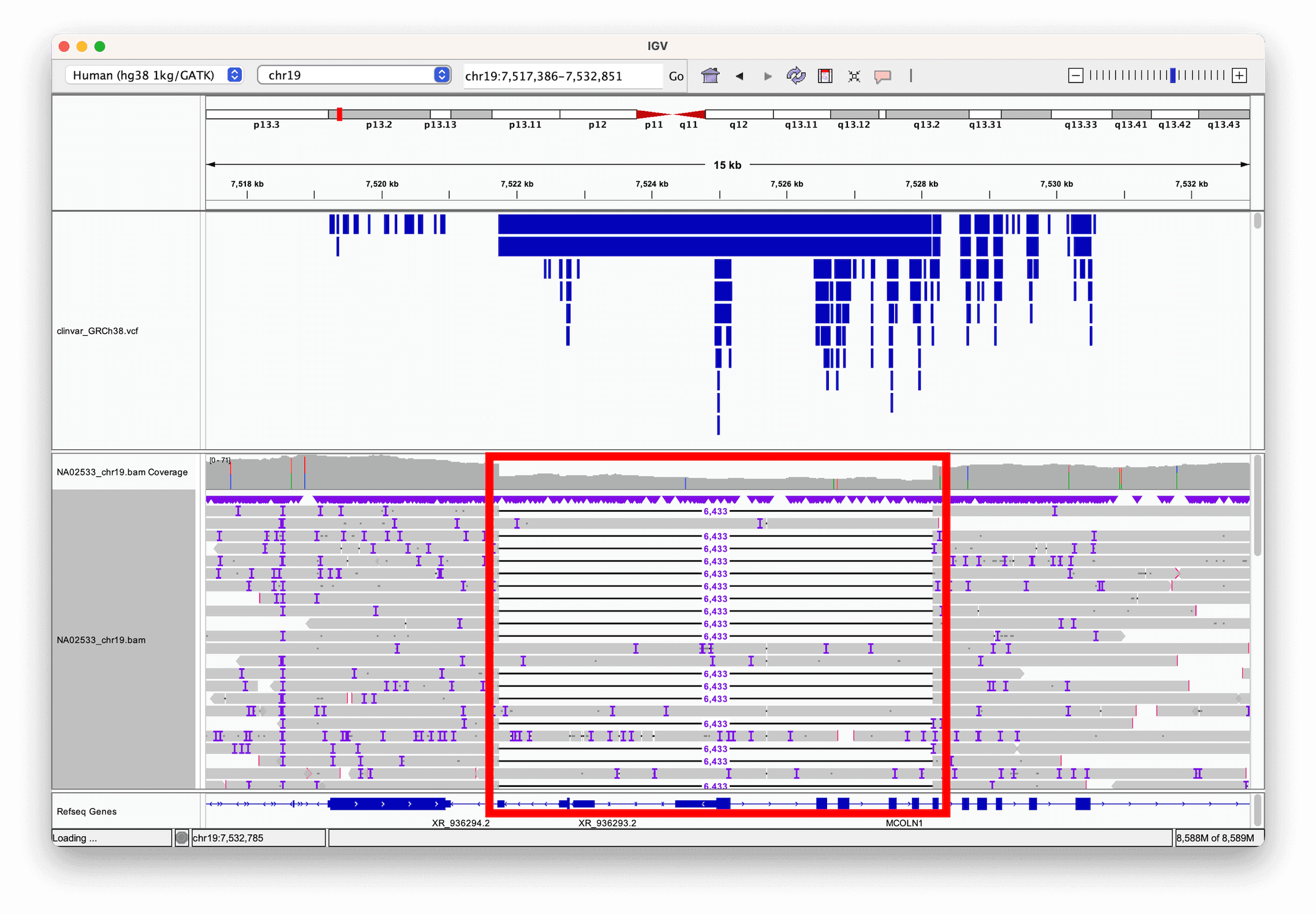
A single long read spanning a structural variant breakpoint does not need a second read to reveal it (unlike the paired-end evidence used in Viewing Structural Variants) — the read itself can be split: part of it aligns on one side of the breakpoint, part on the other. Sorting reads by length and looking for this pattern makes large events easy to spot. Here, a 6 kb deletion in a reference sample (called by the structural variant caller Sniffles2) is directly visible as reads that align partially, then resume on the far side of the deleted region — with a ClinVar annotation track confirming the deletion is a known clinically-relevant variant:
Hands-on: find an inversion in public long-read data
You can try this yourself, on real public data, without downloading anything first. File > Load from URL… lets IGV stream just the bytes it needs directly from a remote server, the same way Load from Server… does for IGV’s own hosted datasets.
This example uses ultra-long Oxford Nanopore reads for HG002, the Ashkenazim trio son reference sample from the Genome in a Bottle (GIAB) Consortium, aligned to hg38 and hosted by NCBI.
- Select Human hg38 from the genome drop-down menu.
- Select File > Load from URL… and paste:
OUTPUT
https://ftp-trace.ncbi.nlm.nih.gov/giab/ftp/data/AshkenazimTrio/HG002_NA24385_son/Ultralong_OxfordNanopore/combined_2018-05-18/combined_2018-05-18.hg38.sorted.cramIGV automatically finds the matching .crai index at the
same URL — you do not need to load it separately. (The CRAM file itself
is over 10 GB, but IGV only ever requests the small portion of it
covering the region you are viewing.)
- Repeat File > Load from URL… for a second, independently-phased ultra-long nanopore dataset for the same sample, which you will use later in this section:
OUTPUT
https://ftp-trace.ncbi.nlm.nih.gov/giab/ftp/data/AshkenazimTrio/HG002_NA24385_son/UCSC_Ultralong_OxfordNanopore_Promethion/HG002_GRCh38_ONT-UL_UCSC_20200508.phased.bamThis file is much larger (its index alone is 52 MB), so this load step may take a little longer — but as before, IGV still only streams the region you actually view.
- Type
chr20:10,804,515-10,811,999into the search box and click Go.
At this zoom level you will see the same dense, indel-heavy raw
signal described earlier in this episode — feel free to apply quick
consensus mode here too. For now, focus only on the
combined_2018-05-18 track (leave the second,
...phased.bam track alone; you will come back to it). To
reveal the structural signal underneath the noise:
- Right-click the
combined_2018-05-18alignments and select Link supplementary alignments. Long reads spanning a structural variant breakpoint are often aligned as a primary alignment plus one or more separate supplementary alignments; this option draws all the pieces of one read on a single row, connected by a thin line — the direct long-read equivalent of the paired-end linking you used with View as pairs in the previous episode. - Right-click the same track again and select Color alignments by > Read strand.
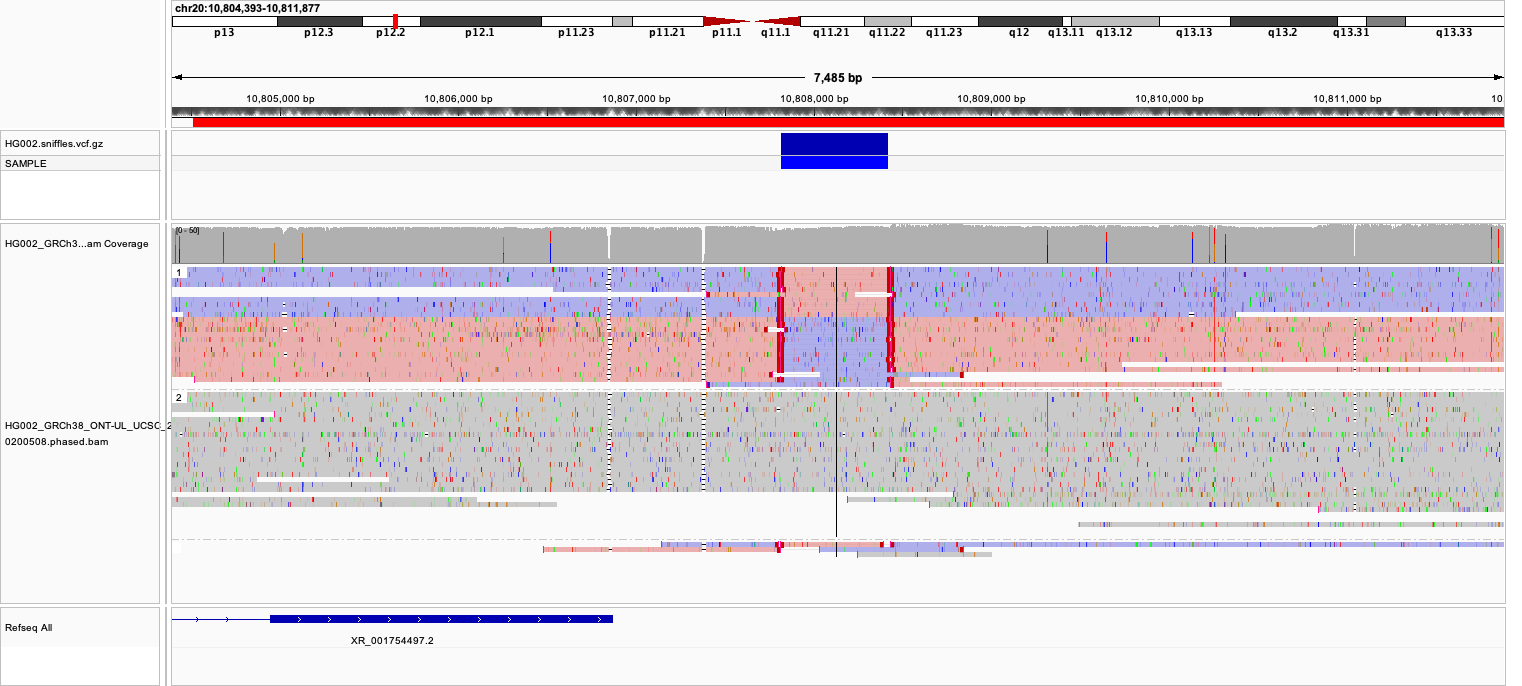
combined_2018-05-18), linked and colored by read strand,
shows a block of reads switching from pink (forward) to purple (reverse)
and back. The second track below it (the phased BAM) is still in its
default, unstyled appearance at this point — you will style it in the
next step.Most reads across this region are colored pink (forward strand). A block of reads in the middle of the view, however, switches to purple (reverse strand) before switching back — exactly the same-strand-block-then-switch-back pattern you would expect if a segment of the genome were inverted between two nearby breakpoints, this time visible directly within single linked reads rather than needing separate discordant pairs.
Where are the breakpoints?
Using the color switch as a guide, estimate the two breakpoints of this inversion from the view. (For comparison: this call was originally made by the long-read structural variant caller Sniffles2, the same tool used for the deletion example earlier in this episode.)
The breakpoints sit wherever the read coloring switches from pink to
purple (the first breakpoint) and back from purple to pink (the second)
— at roughly chr20:10,807,800 and
chr20:10,808,450 in this data. You do not need Sniffles2
(or any variant caller) to find this — the same visual evidence a caller
uses is directly visible once the reads are linked and colored by
strand.
Is the inversion on one haplotype, or both?
Now turn to the second track you loaded,
HG002_GRCh38_ONT-UL_UCSC_20200508.phased.bam. As the name
suggests, its reads have already been assigned to a haplotype by a
phasing tool, tagged with the HP BAM attribute — exactly
the kind of tag described next.
- Right-click that track and select Color alignments by >
Tag, then enter
HPas the tag name. Optionally also Group alignments by > Tag with the same tag, to separate the two haplotypes into clearly divided blocks rather than an interleaved mix of colors.
Heterozygous or homozygous?
Compare the two haplotype groups at the same breakpoints you identified above. Are reads showing evidence of the inversion confined to one haplotype, or do both haplotypes show it? What would each answer imply biologically?
If the discordant, split/strand-switching read pattern only appears in one haplotype group while the other haplotype’s reads look normal all the way through, that is evidence the inversion is heterozygous — present on only one of the two parental chromosomes. If both haplotype groups show the same discordant pattern, that would instead suggest a homozygous inversion, present on both chromosomes. This is exactly the kind of question phasing lets you answer that an unphased view cannot: an unphased track only tells you that some reads are discordant at this locus, not which chromosome copy they came from.
Haplotype phasing, more generally
The HP tag you just used works because long reads are
long enough to span multiple nearby variants on the same
physical DNA molecule, which lets phasing tools (such as WhatsHap or
LongPhase) tag each read with which parental haplotype it belongs to.
Coloring and sorting reads by HP groups them into their two
haplotypes, making it easy to compare alleles side by side — useful well
beyond structural variant zygosity. In this example — a short tandem
repeat expansion in the FMR1 gene — one haplotype carries a
much larger insertion than the other; grey reads could not be
confidently assigned to either haplotype:
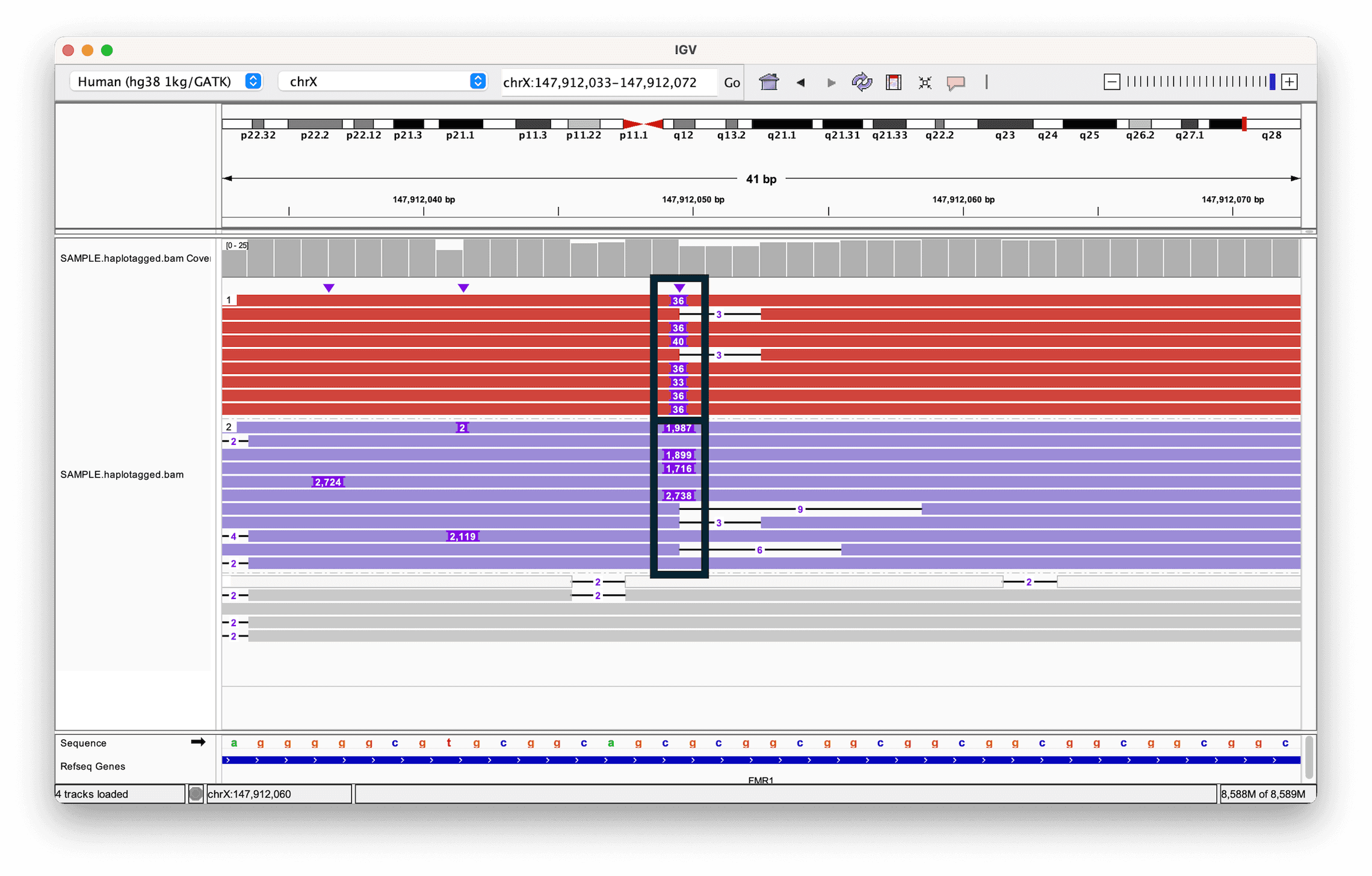
Why does phasing matter here?
Both alleles in the example above contain an insertion, just of different sizes. Why is knowing which reads belong to which haplotype useful, rather than just looking at the insertion sizes across all reads together?
Without phasing, you would see a mix of insertion sizes at the locus and have to guess whether that reflects two distinct alleles (e.g. one normal, one expanded) or a more continuous, noisy distribution. Grouping reads by haplotype turns that ambiguous mixture into two clean, separately interpretable groups — letting you say, for example, “this individual has one allele of roughly this repeat length and a second allele of roughly that length,” which is exactly the kind of call needed to assess conditions like Fragile X syndrome (associated with FMR1 repeat expansions).
- Long reads (PacBio, Oxford Nanopore) trade a higher per-read error rate for much greater length than short Illumina reads.
- IGV’s quick consensus mode and indel-hiding thresholds (View > Preferences > Alignments) filter raw long-read noise so consensus signal is easier to see.
- A read’s MAPQ score (0–255) reflects alignment confidence; low MAPQ is a warning sign for any variant called from that read.
- File > Load from URL… streams a remote BAM/CRAM directly from a server (finding its index automatically), without downloading the whole file first.
- Link supplementary alignments connects a single long read’s split pieces on one row; combined with Color alignments by > Read strand (pink = forward, purple = reverse), this reveals an inversion directly within individual reads.
- A single long read can directly reveal a structural variant by splitting across its breakpoint, without needing paired-end evidence.
- Coloring and grouping reads by haplotype (
HP) tag separates two alleles for direct comparison, useful for phased variants and repeat expansions — and for telling a heterozygous structural variant (one haplotype) apart from a homozygous one (both haplotypes).