
Viewing Alignments and SNPs
Last updated on 2026-09-03 | Edit this page
Overview
Questions
- How do I inspect individual sequencing reads that support a candidate variant?
- How can I tell a real SNP apart from a technical artifact?
- What does a BAM alignment record actually contain?
Objectives
- Load aligned sequencing reads from a BAM file alongside a BED file of candidate variant sites.
- Read mismatched bases, coverage, and allele counts from an alignment track.
- Sort and color aligned reads to help distinguish real variants from artifacts.
- Use BLAT to check whether a suspicious signal is a genuine mapping or a multi-mapping artifact.
Background: paired-end sequencing and the BAM format
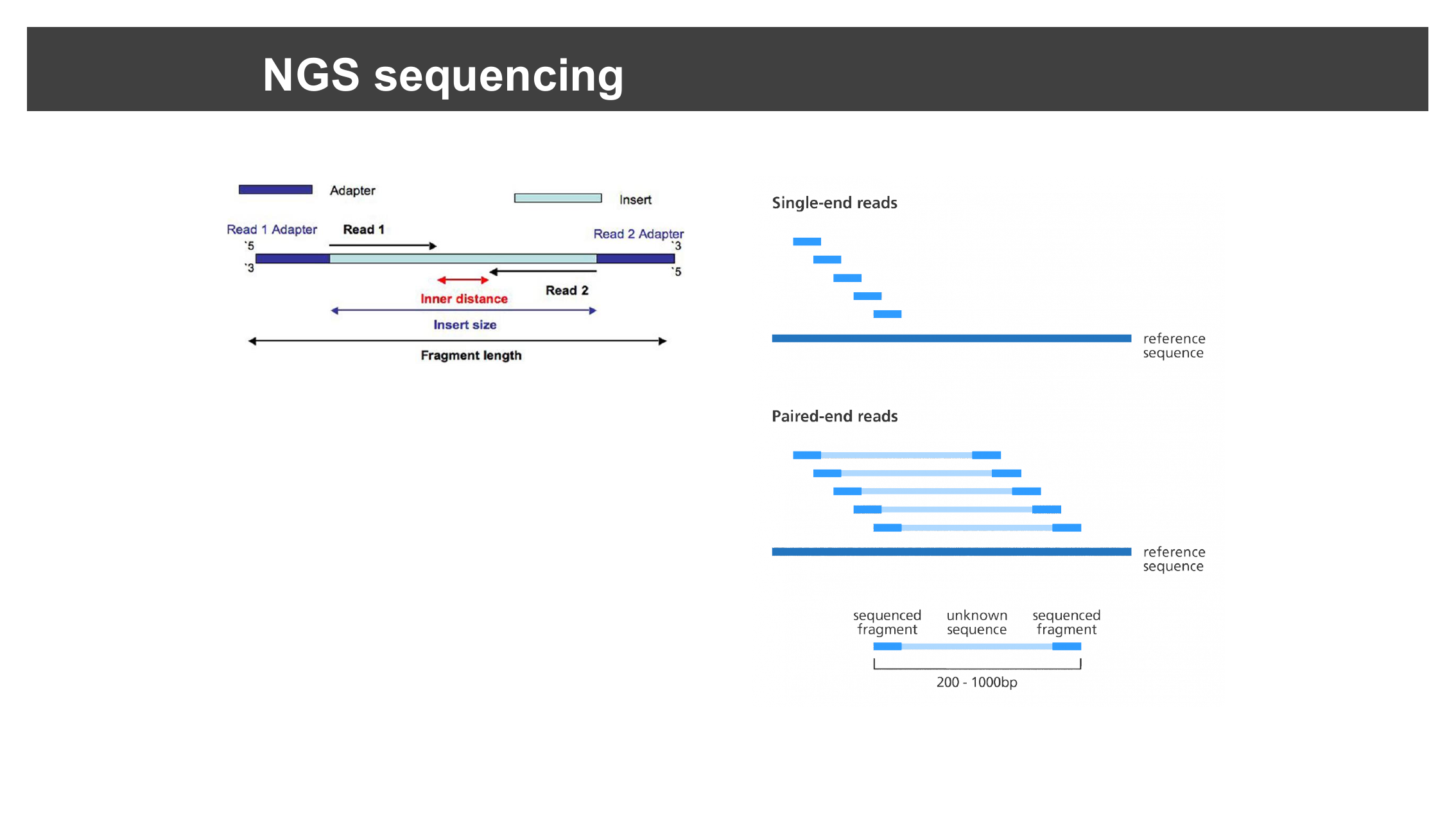
The alignment file you will load in this episode comes from paired-end Illumina sequencing: each DNA fragment is read from both ends, producing two reads (Read 1 and Read 2) separated by an unsequenced gap. The distance between the two reads’ outer edges is the insert size.
Aligned reads are stored in SAM/BAM format (Sequence Alignment/Binary Alignment Map — BAM is just a compressed, indexed binary encoding of SAM). Each alignment record includes the read name, its mapping position, a mapping quality score, a CIGAR string describing matches/insertions/ deletions along the alignment, information about its paired mate, and the read’s sequence and per-base quality scores.
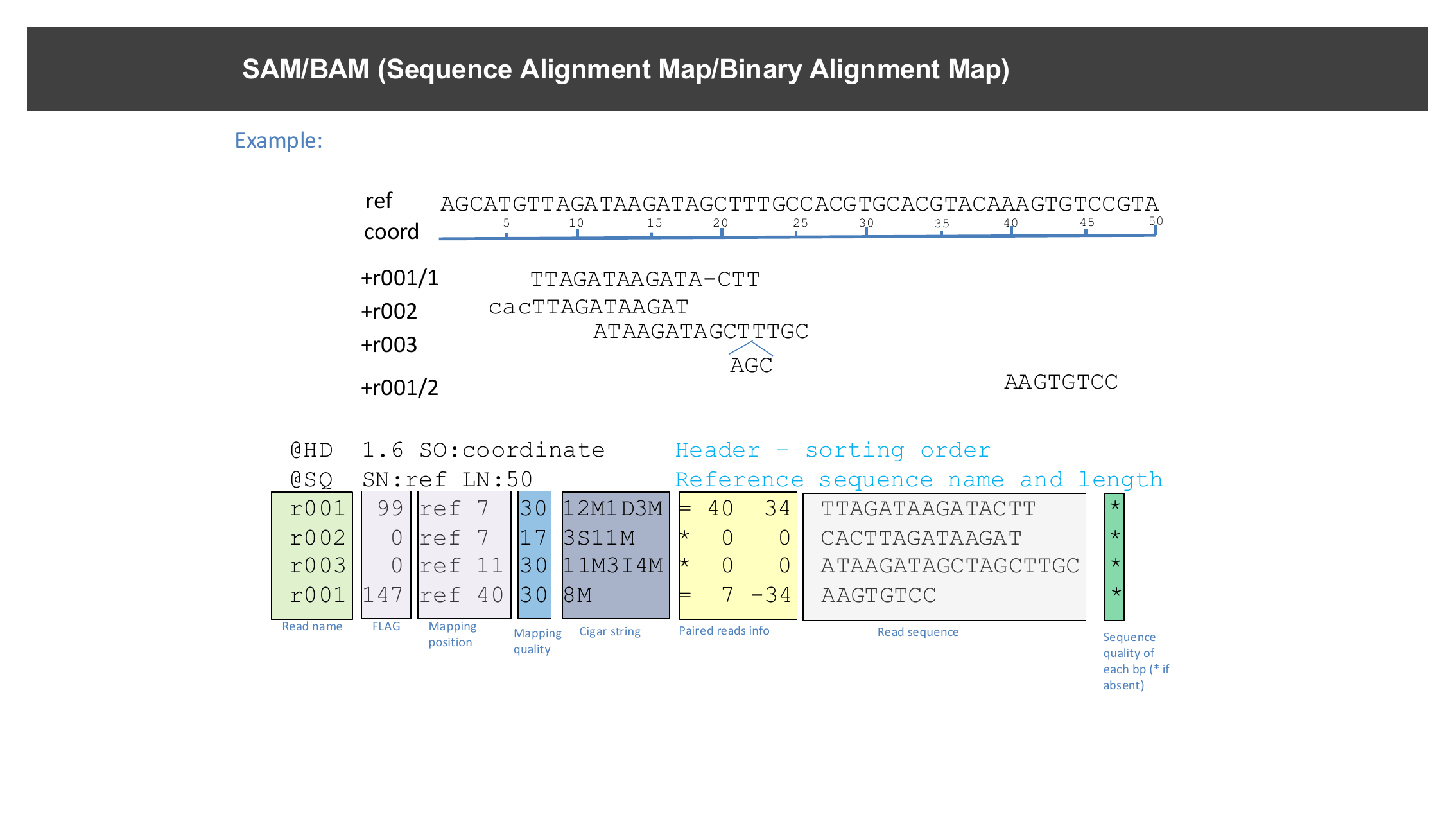
You do not need to read SAM/BAM records by hand to use IGV — this is what IGV’s alignment track visualizes for you — but recognizing these terms (insert size, mapping quality, CIGAR) will help you make sense of the popups and sort/color options used throughout this episode.
Reference genome
Make sure the reference genome is still set to the one you loaded in
the previous episode: select chr1.fasta from the genome
drop-down menu if needed.
Load the alignment and candidate SNP data
Select File > Load from File…, navigate to
igvData/snps/, and open:
-
snp_calls.bed— a BED file marking two candidate SNP loci, and -
NA12878.SLX.sample.bam— a small sample alignment file.
Loading a BAM file’s index
IGV automatically finds a BAM file’s index (.bai) as
long as it is named correctly
(e.g. NA12878.SLX.sample.bam.bai) and sits in the same
folder as the BAM file. Do not load the
.bai file directly — only load the .bam
file.
Navigate to the first candidate SNP
Type snp1 into the search box and click
Go.
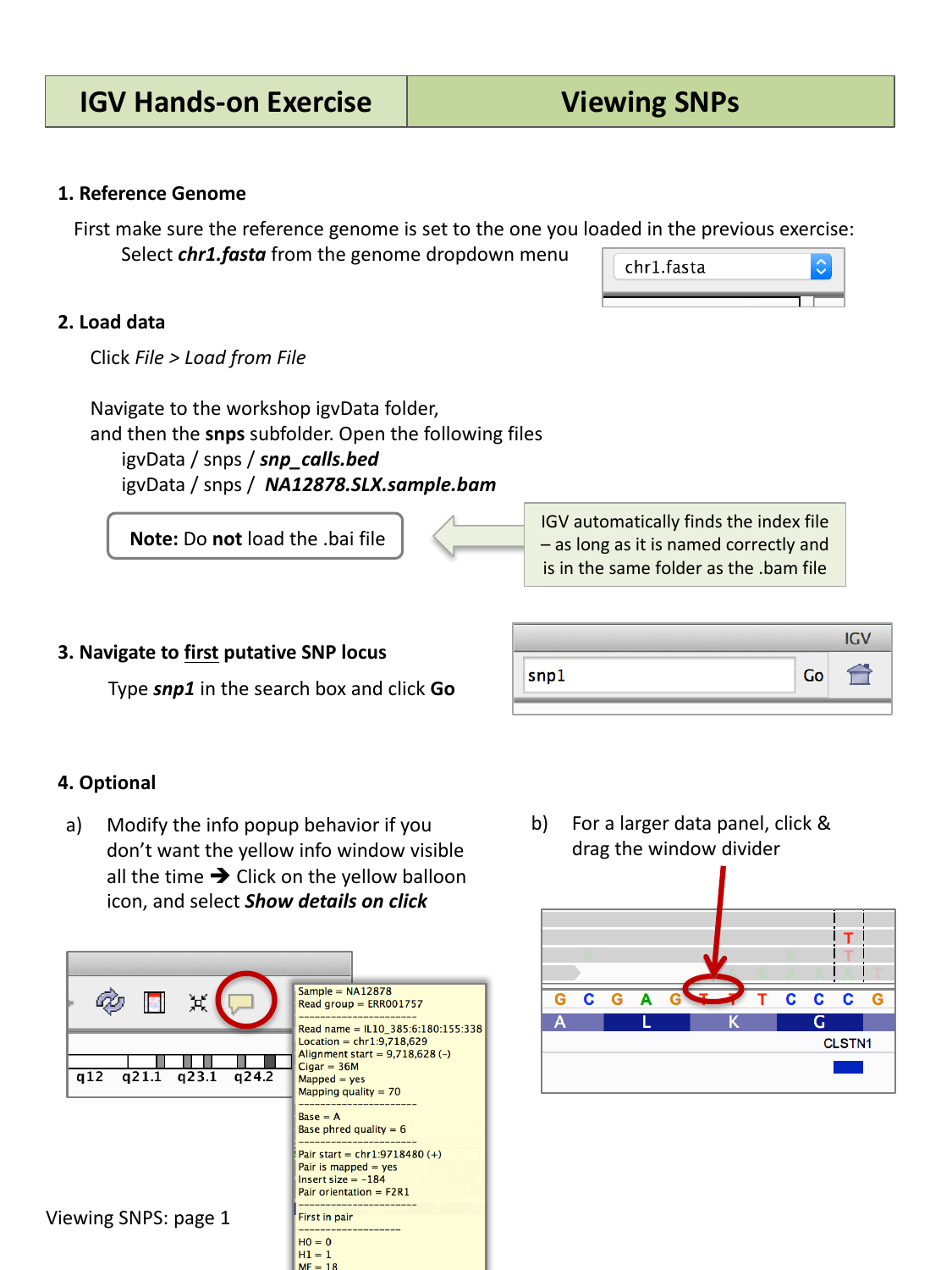
You should see individual aligned reads stacked as grey bars, with a red or blue bar above them summarizing the coverage and any mismatches at each position (the coverage track).
Popup behavior
By default, hovering over a read shows a popup with details (read name, alignment position, mapping quality, and more). If you would rather the popup only appear on click, click the yellow speech-bubble icon in the toolbar and choose Show details on click.
Sort reads by base to spot a real mismatch
First, click and drag to position the mismatched bases between the two vertical center guidelines. Then right-click (Mac: control-click) anywhere in the aligned reads and select Sort alignments by > base.
Mouse over (or click) the colored bar in the coverage track to see the exact allele counts and frequencies at that position.
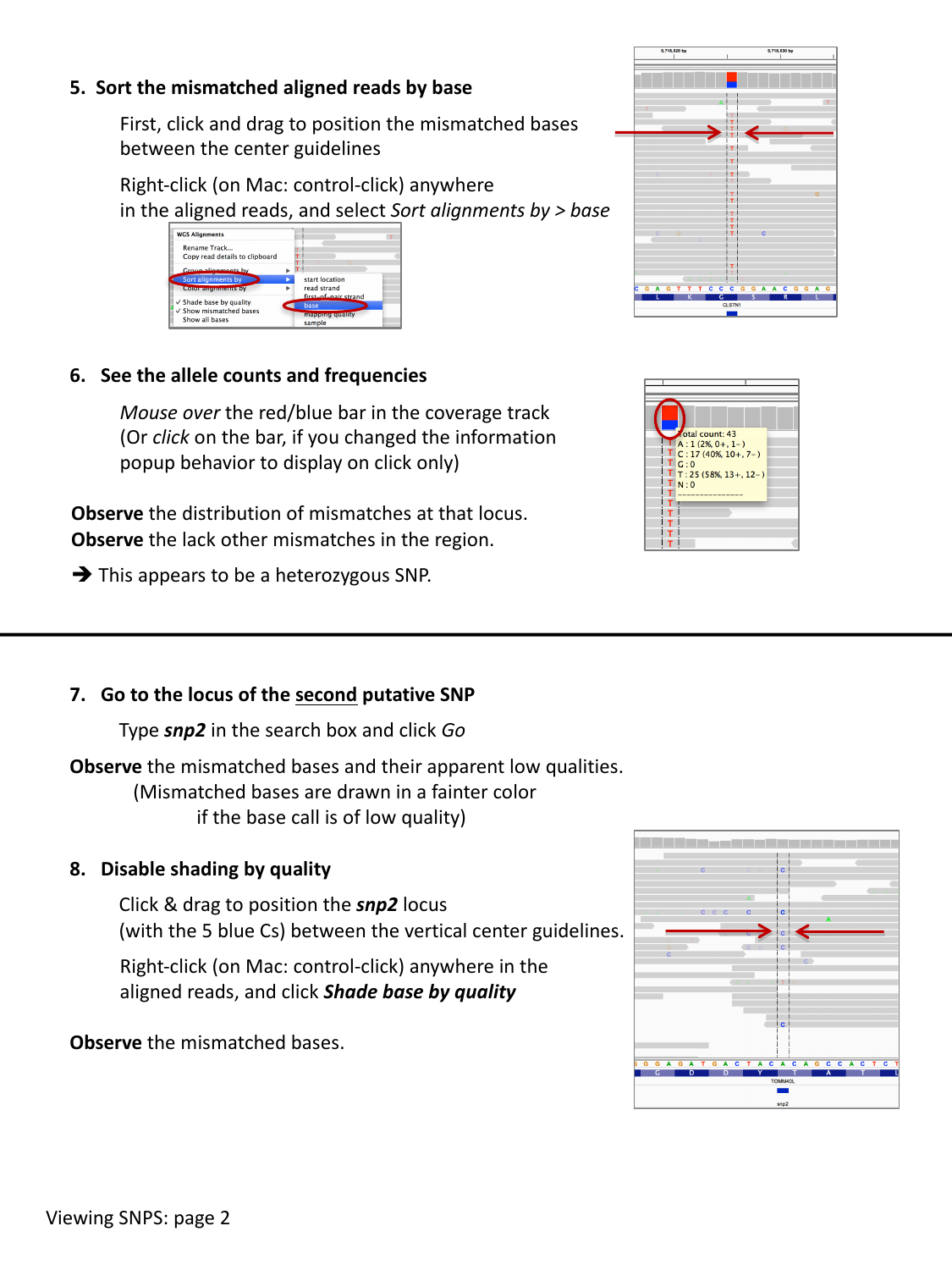
Observe the distribution of mismatches at this locus, and the lack of other mismatches nearby. This pattern — a consistent mismatch across many reads, at roughly the frequency you would expect for a heterozygous site, with no other noise around it — is a good sign of a real heterozygous SNP.
Compare the two candidate SNPs
Go to the locus of the second candidate SNP by typing
snp2 into the search box and clicking Go.
Compare what you see to snp1 — in particular, look at the
color/brightness of the mismatched bases (a fainter color indicates a
lower base quality). Right-click the aligned reads and toggle
Shade base by quality off and on to compare.
At snp2, many of the mismatched bases are drawn faintly,
meaning IGV is shading them by low base call quality. Turning off
Shade base by quality makes every mismatch look equally
solid, which can be misleading — with shading on, it becomes clear that
this locus is dominated by low-quality base calls rather than a strong,
consistent signal like at snp1. This is a warning sign that
snp2 may not be a real variant.
Sort and color reads by strand
Right-click anywhere in the aligned reads and select Sort alignments by > read strand, then right-click again and select Color alignments by > read strand.
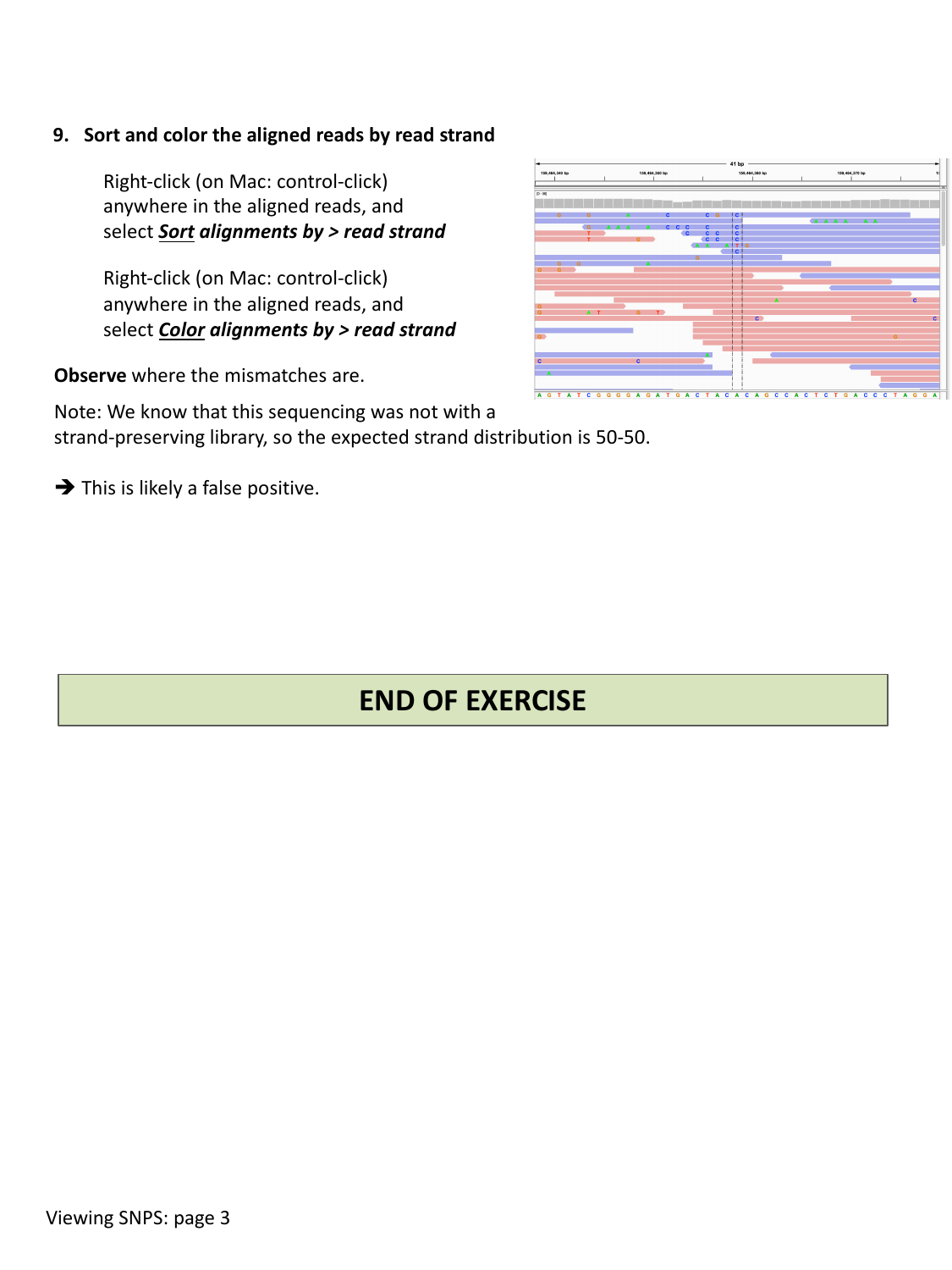
Observe where the mismatches fall relative to strand. If a sequencing library was not strand-specific, you would expect roughly a 50/50 split of reads on each strand, and a real variant should appear consistently on reads from both strands. If a mismatch only ever appears on reads from one strand, that is a red flag for a strand-specific artifact rather than a genuine variant.
Decide: real SNP or artifact?
Using strand sorting/coloring, examine snp2 again. Given
that this sequencing library was not strand-preserving
(so you would expect the mismatch on both strands roughly equally), what
do you conclude about snp2?
If the mismatched bases at snp2 are concentrated on
reads from only one strand, despite the library not being
strand-specific, this locus is likely a false positive
rather than a real heterozygous SNP — combined with the low base quality
observed earlier, there are now two independent pieces of evidence
against it being real.
Using BLAT to check a suspicious signal
Sorting and coloring reads tells you a lot, but sometimes a coverage
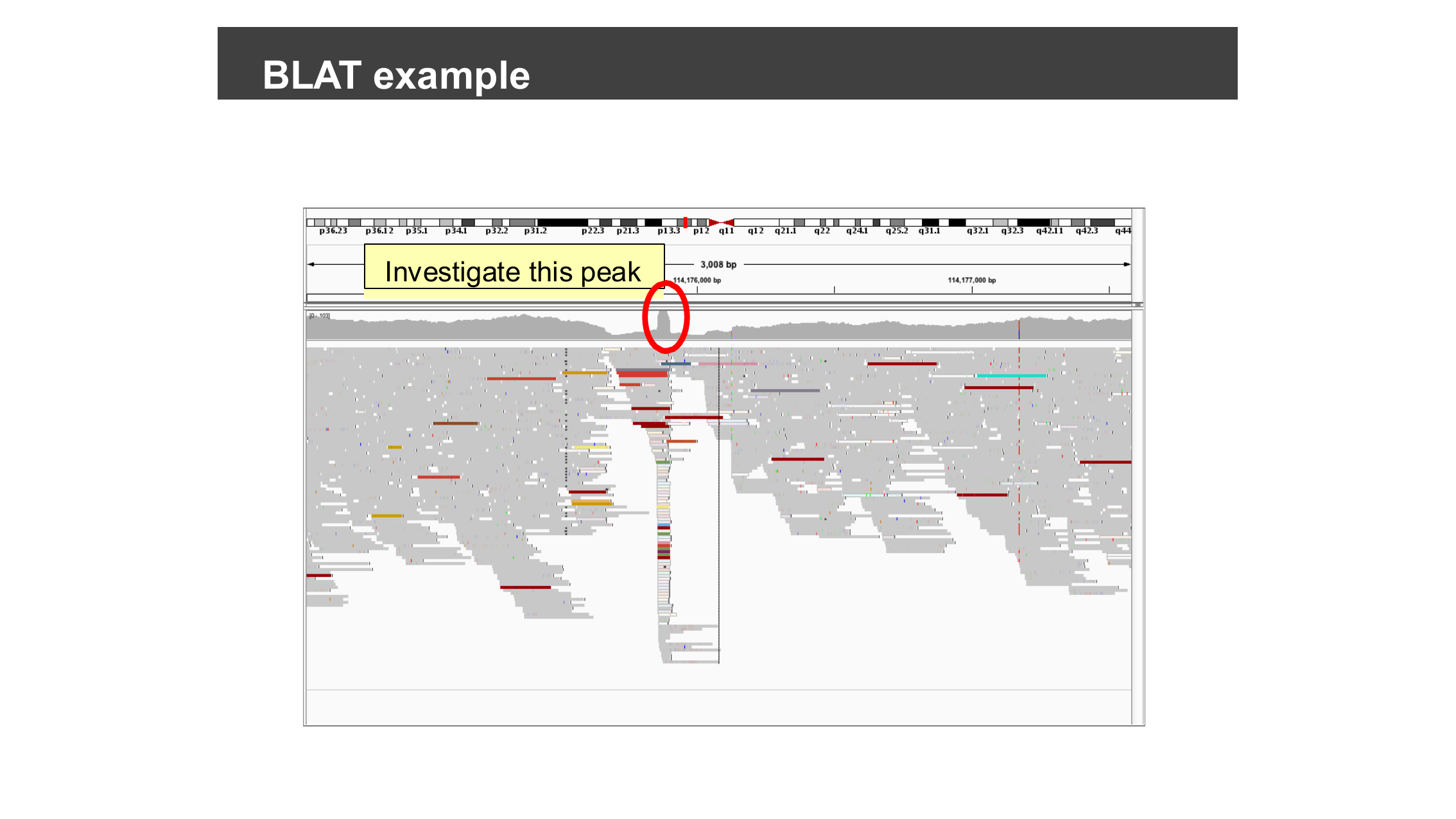
peak or a cluster of mismatches is suspicious for a different reason:
the reads underneath it might not belong there at all.
BLAT (Tools > BLAT…) lets you take a
read’s sequence (or any feature, or a sequence you type in) and search a
BLAT server for alternative places it could align in the genome.
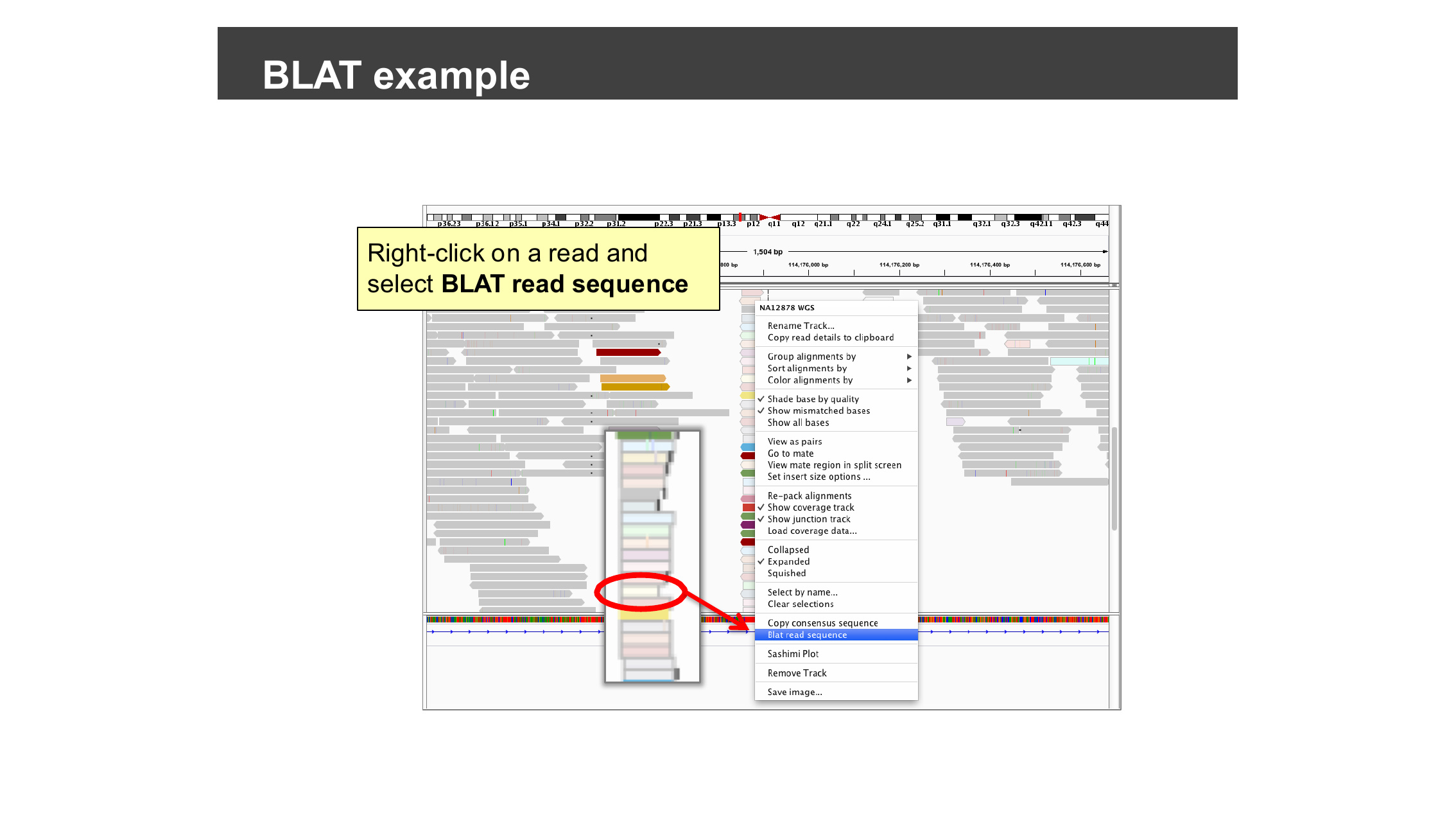
Right-click on a read at the locus you want to check and select BLAT read sequence.
BLAT returns every place in the genome the sequence aligns well, ranked by score.
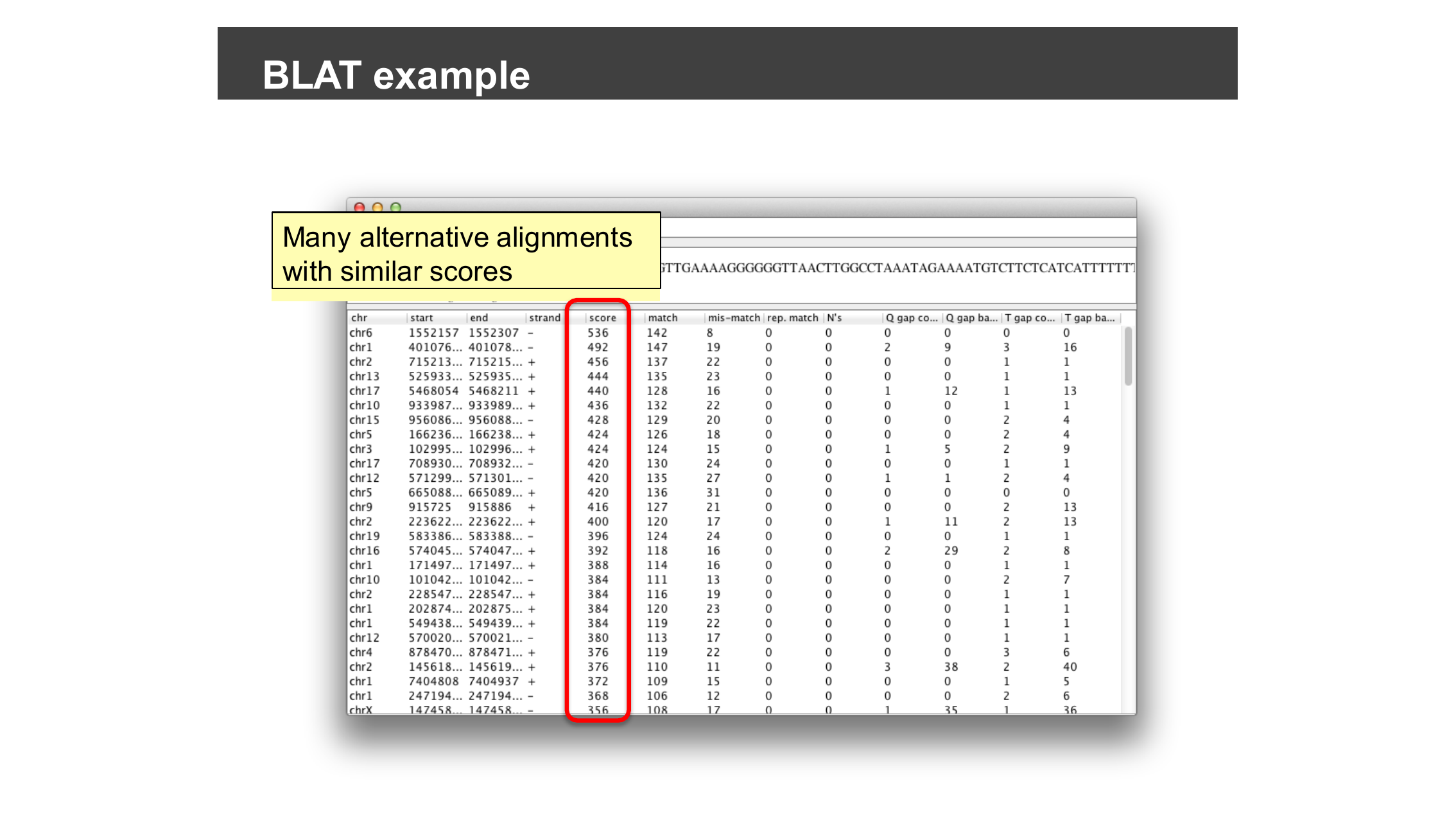
If BLAT returns one clearly best-scoring hit at the expected locus, the alignment is trustworthy. If it instead returns many alternative alignments with similar scores scattered across the genome — as in the example above — the read comes from a repetitive sequence that maps almost equally well to many locations, and the signal at your original locus should be treated with suspicion rather than taken as strong evidence for a variant.
When would BLAT change your conclusion?
You already found two independent warning signs against
snp2 being a real variant (low base quality, strand bias).
Suppose BLAT on a snp2 read had instead returned dozens of
equally good alternative alignments elsewhere in the genome. Would that
change your confidence, and why?
It would add a third, independent line of evidence against
snp2: reads that multi-map almost equally well to many
locations cannot be confidently placed at any single locus, so any
“variant” called from them is likely an artifact of ambiguous mapping
rather than a true difference from the reference genome at that specific
position.
Watch: IGV Sequencing Data Basics
- Aligned reads are stored in SAM/BAM format; recognizing terms like insert size, mapping quality, and CIGAR string helps you interpret what IGV shows you.
- Load a BAM file with File > Load from File…; IGV
finds its
.baiindex automatically as long as it is named correctly and kept alongside the BAM file. - Sorting and coloring aligned reads (by base, by base quality shading, or by read strand) helps you distinguish a real variant from a sequencing or alignment artifact.
- Warning signs of a false-positive variant include low base quality and a mismatch that only appears on reads from one strand when it should not.
- Tools > BLAT… (or right-click a read and choose BLAT read sequence) checks whether a read aligns uniquely or is a multi-mapping artifact from a repetitive region.